
The Power of Lazy Evaluation in Apache Spark

Introduction to Lazy Evaluation
The concept of Delayed Gratification is one of the best techniques to build discipline. I apply that to my daily life (or at least I try to :p) to become better overall. Let’s understand it quickly by breaking it down: Gratification is a pleasure and delay is, of course, delaying and when you delay your pleasure (gratification), then that’s delayed gratification. You can feel the pleasure immediately but postpone it and save it up for the future to improve productivity, efficiency, consistency, etc. The same concept is akin to Lazy Evaluation!
As the name says, it is lazily evaluated meaning it doesn’t get evaluated immediately or in other words, not until you call it. Simple as that! Lazy Evaluation is a normal technique in programming that is widely defined as an evaluation strategy that delays the evaluation of an expression until its value is needed. Now, if you compare the definition with my first point, it would make sense! It is also known as delayed evaluation.
How Lazy Evaluation Works in Spark?
Apache Spark borrows the concept of Lazy Evaluation to be fault-tolerant. If you’re already familiar with Spark, then you must know about RDDs/DataFrame. They’re nothing but immutable, fault-tolerant, and distributed data structures that can be processed in parallel across a network of nodes.
There are 2 operations that can be applied to an RDD. One is Transformation and the other one is Action. For every transformation you do, it can be executed only when an action is called. This is lazy evaluation in Spark!
Transformations
Transformations when executed produce a new RDD from an existing one leaving the original one untouched and intact. This is why they are immutable. They are lazy operations and can be executed only when you call an action. Until then, it creates a lineage graph or DAG of transformations.
There are two types of transformations:
Narrow Transformation
Wide Transformation
Narrow Transformation
Data that comes from a single partition and doesn’t require any movement is known as Narrow Transformation. To break it down, when you have 3 partitions and you’re doing a transformation with a set of data that resides inside one partition. Spark will realize there’s no need for any data shuffling in this case as it is inside a single partition. Operations such as map(), filter(), flatMap(), and union() are some examples of arrow transformation.
Wide Transformation
Transformation that incurs shuffling/movement of data across the network is known as wide transformation. To break it down, when you have 3 partitions and you do a transformation that requires data from two or more partitions. Examples are groupByKey(), join(), repartition(), etc.
Actions
Until you call an Action, Spark creates a DAG containing all the Transformations and optimizes them for a proper execution plan. Action executes the transformations, performs computation, and gives the result (transformed data) to us. Operations such as show(), count(), collect(), and saveAsTextFile() are some examples of Actions. Spark creates a DAG containing all the Transformations and optimizes an execution plan. Unless you call an Action, you won’t get the desired output!
What's the Purpose?
Spark’s Catalyst Optimizer is very helpful when you delay your execution. Delaying it means Spark has time to analyze and optimize the entire sequence of Transformations. Catalyst Optimizer will simply understand the request, simplify it, and give us the best result possible. It minimizes data shuffling, and reorder operations, and could also group multiple Transformations into one that will reduce the number of passes on data.
As we saw above, Spark creates a graph of Transformations that will produce data once executed. Let’s say your node fails or your data is lost due to some issues, Spark can easily re-compute the lost data by re-running the Transformations and this is how it’s fault-tolerant.
Example
Take a look at the image below.
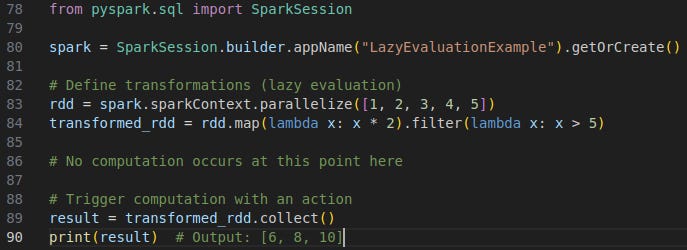
To break things down, we are creating a SparkSession, multiplying the numbers from 1 to 5 by 2, and filtering the ones that are greater than 5 after multiplication. This is a Transformation basically. At the end, we trigger the computation by calling an Action which is collect() in this case.